
If you’ve ever stared at your tracker showing 40 conversions while Ads Manager insists there are only 22, you already understand the problem this guide addresses. It’s the difference between two algorithms: one that can optimize for users who are in the green, and another that operates blindly based only on the data it actually receives. On paid social platforms, the platform optimizes based on the data it sees, not what actually happens—so every conversion that fails to reach Meta or TikTok is a signal you paid for and then wasted.
Most people running social traffic still rely almost entirely on browser pixels. That worked fine a few years ago. Today, it suffers from heavy data loss, and it’s only getting worse. This tutorial will walk you through: why client-side tracking fails, what server-side tracking actually solves and how to configure it so your attribution data survives the journey from click to conversion—while also noting specific details to watch for when an intermediary tracker (almost always present in affiliate marketing setups) is involved.
Why Do Browser Pixels Miss Data?
A pixel is a piece of JavaScript code that runs in the user’s browser. That’s where its weakness lies. Anything that interferes with the browser interferes with your data, and there are many such factors today.
The biggest issue is Apple’s App Tracking Transparency (ATT). When users opt out (as most do), the identifiers the pixel relies on are stripped or restricted. On top of that, you have ad blockers, aggressive privacy browsers, consent banners that block scripts before a user clicks, and the gradual death of third-party cookies. These aren’t edge cases anymore—together, they can quietly eat away double-digit percentages of your conversion events.
The same applies to other social media platforms. For example, TikTok has an additional issue that catches many media buyers off guard: most users stay within TikTok’s in-app browser after clicking your ad, which is a restricted WebView. This environment limits cookie access and strips the identifiers the pixel needs to match the conversion back to the user. Consequently, even a “perfectly installed” TikTok pixel can quietly underreport, and you wouldn’t know just by looking at the installation status.
The result is the same on both platforms: conversions happen, your offer or affiliate network records them, but the ad platform never gets the memo for a portion of them. Optimization suffers, your reported CPA looks worse than it actually is, and decisions to scale budgets are made based on flawed data.
What CAPI and Events API Actually Do
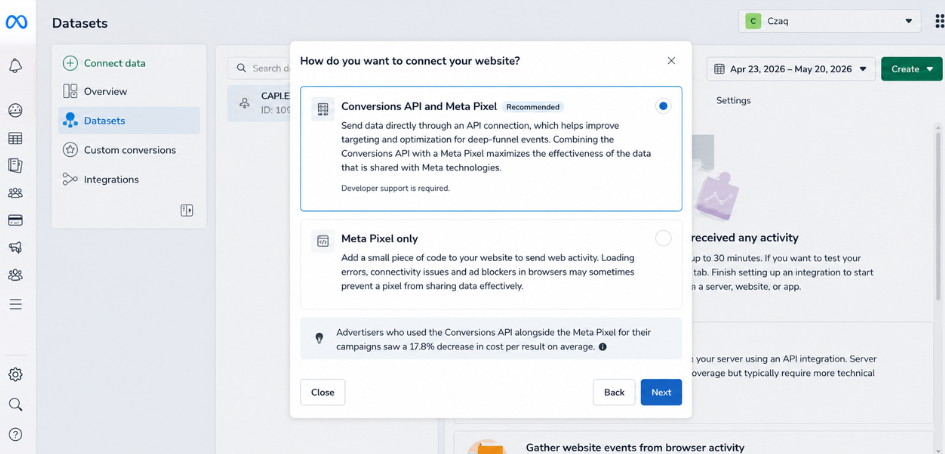
Meta’s Conversions API (CAPI) is the server-side solution to all the problems mentioned above. Instead of relying on a script running in an unreliable browser, it sends conversion events directly from a server to the platform’s measurement endpoint. No ad blockers, no WebViews, and no cookie banners can get in the way.
The goal isn’t to replace the pixel—it’s to provide redundancy. Think of it as two paths carrying the same event:
- The pixel still fires in the browser, which is useful for PageView, ViewContent, AddToCart, and remarketing signals.
- Server-side events are the resilient backup used to capture conversions the browser misses. For high-value final actions like a Purchase or Lead, the server-side event is usually the more reliable of the two.
When both paths work correctly, you get better coverage. But running both at the same time introduces a new risk that almost everyone trips over the first time: counting the same conversion twice.
Deduplication: The Part Everyone Gets Wrong
If your browser pixel and your server send the same Purchase event without telling the platform they are the same event, you’ll get double counting. Conversion data becomes inflated, CPAs look too good to be true, and your optimization signals are flooded with fake data.
The fix is deduplication, which relies on one key factor: a shared event_id. Both the browser event and the server event must carry the same event_id and the same event name (e.g., Purchase). When the platform sees two events with matching identifiers, it merges them and counts them as one.
A few practical rules to save you trouble:
- Generate the event_id once at the moment the action occurs, before any tags fire—then pass that same value to both the pixel and the server call. A common pattern is combining an order/transaction ID with a timestamp.
- Event names must match exactly on both sides. “Purchase” on the browser and “CompletePayment” on the server will never be deduplicated.
- Timing matters. On TikTok, duplicate events with the same event_id are merged if they arrive within 48 hours of the previous one. Meta also expects both versions to be close in time. Don’t lag by days before firing the server event and expect a clean merge.
If you skip this step, server-side tracking won’t just fail to fix your data—it will double your problems.
Maintaining Attribution Through Your Tracker
This is where an affiliate marketing setup differs from a standard e-commerce site: you usually have a tracker (RedTrack, Voluum, BeMob, Binom, etc.) sitting between the ad and the offer, and the conversion itself is triggered on the affiliate network/advertiser side, then sent back to you as a postback (S2S). By the time the conversion is confirmed, the browser is usually long gone. So, how does the platform know which click brought the sale?
The answer is the click identifier. When a user clicks your ad, the platform appends its click ID to the URL—fbclid for Meta and ttclid for TikTok. Your tracker needs to capture and store this Click ID at the moment of the click. Then, when the conversion postback comes in, the tracker fires the server-side event to the CAPI/Events API and passes back the stored Click ID. This is how you close the loop and tell the algorithm: this specific click converted.
Specifically, identifiers worth passing in server-side events include:
- Click ID—Meta’s
fbc(derived from fbclid) and_fbpcookie; TikTok’sttclidandttp. These are the single biggest levers for match quality. - Hashed user data, provided you legally own it—such as email, phone, IP address, and user agent. More valid match signals mean higher match quality, leading to better optimization.
Most modern trackers now have built-in CAPI/Events API integrations, so in practice, this is more about configuration than custom coding. But you still need to set it up intentionally and confirm that the Click ID is actually passing through the entire chain. A tracker firing server-side events without a Click ID or user data might technically “work,” but it will match almost zero conversions.
Why Your Tracker and Ads Manager Will Never Match Perfectly
Set your expectations now: these two numbers will not match down to the single digit, and that’s normal. They are counting different things. Your tracker records every conversion the affiliate network reports to you. The ad platform only counts conversions it can attribute to one of its own clicks within its attribution window (Meta’s default is usually 7-day click, 1-day view; TikTok offers configurable windows). A conversion that falls outside the window, or one where the platform can’t match the click, won’t show up in Ads Manager at all, even though it’s real revenue in your tracker.
So, don’t chase a perfect match. Chase a stable, explainable gap. Once CAPI/Events API is live and deduplication is working, that gap should narrow and stay consistent. A suddenly widening gap is your early warning signal that something is wrong—perhaps a missing Click ID, a changed event name, or an expired Access Token.
Validation Checklist Before You Trust the Data
Don’t declare victory just because events are showing up in green. Let the pixel and server-side run in parallel for a few weeks and confirm:
- Both browser and server events are arriving in Events Manager for the same event name.
- Deduplication is actually working—you see one merged conversion instead of two.
- Match quality is healthy (on Meta, aim for an Event Match Quality well above the midpoint; on TikTok, watch the Match Quality Score)—this depends heavily on Click IDs and hashed user data.
- Click IDs are present in server-side conversions, not blank.
- Your Access Token is valid and hasn’t quietly expired.
- The gap between your tracker and Ads Manager is stable and you can explain why.
Get this right, and the payoff is real: the algorithm optimizes based on actual results rather than noisy partial data, your reported ad costs reflect reality, and you can scale budgets based on data you actually trust. Get it wrong, or skip server-side entirely, and you’re making bidding decisions based on a small fraction of what’s actually happening, then wondering why the campaign just won’t scale. ☕

